Jon Kies Explores the Potential of the AREA Human Factors Committee

AR and Human Factor

AREA: What does Human Factors in Augmented Reality encompass?

Kies: Human Factors is the study of humans, from both cognitive and physical perspectives. We investigate how humans interact with devices, applications, and services, and incorporate those insights into the design of systems. In the case of AR, it’s especially important because you may be wearing a device on your head, and interacting via an interface overlaid on the real world.  This is arguably one of the most challenging design problems.


AREA: Do we still have a lot to learn about the Human Factors implications of AR?

Kies: That’s absolutely the case. The technology is still evolving. Many current devices can’t be used for a significant amount of time. It’s going to get there, but there are some technical hurdles that need to be resolved. That’s why it’s super-important that human characteristics become part of the requirements and are factored into the device design process.


AREA: How much of our past user experience knowledge is relatable to AR, and how much is starting from scratch?

Kies: We’re not entirely starting from scratch. A lot of people in the field have experience designing for 2D interfaces like smartphones. But you then have to translate that to a spatial computing paradigm where everything is not only in 3D, but also superimposed on the real world. That’s unlike a smartphone or a PC, where the interface is primarily contained in a rectangle. That’s what makes AR enormously challenging compared to working with other computing platforms. But there has been a lot of research in AR and VR in the military and universities, so there’s a lot to glean from those areas, and established human-centered design processes are still relevant.


AREA: What’s your top priority for the AREA Human Factors Committee this year?

Kies: Our overriding goal is to identify and develop best practices to help ensure the best possible AR user experience. In pursuit of that goal, our number-one priority is to engage more with academic research labs – to invite them to share their findings with the AREA membership. They are often experimenting with or building the latest technologies and they’re learning a great deal from their studies. Another thing we’re discussing is compiling a set of unique human-centered design practices that are pertinent to AR systems. And of course, we always want to get more AREA members involved in the Committee.


AREA: What’s your pitch for why AREA members should get involved in the Human Factors Committee?

Kies: My bias is toward conversation. Having meetings that act as a forum where people can talk about the challenges they’re facing, the successes they’ve had, and just connect – that’s a compelling reason to participate. By participating in Human Factors Committee meetings, end-user members have an opportunity to hear about other members’ experiences and lessons learned and apply that knowledge to their own efforts. For AR solutions providers, it’s an opportunity to get direct feedback from the AR user community.  We also hope that concrete deliverables, like guidance on design, will enable AREA members to optimize their enterprise AR solutions for their target users.


It’s all about making connections and enabling dialogue – between users and providers, between the AR ecosystem and academic institutions – to everyone’s benefit. We’d like to build out a vibrant AR Human Factors community where people are learning from each other, contributing ideas, highlighting new discoveries, and finding solutions.


If you’re an AREA member and would like more information about joining the AREA Human Factors Committee, contact Jonathan Kies or AREA Executive Director Mark Sage. If you’re not yet an AREA member but interested in AR human factors and design, please consider joining; you can find member information here.


AREA Safety Playbook Offers Step-by-Step Guide to Protect Workers

The Augmented Reality Best Practice Safety Playbook discusses:

  • Risk factors to consider when using AR systems in work environments
  • Risk assessment tools and methods
  • Usability considerations
  • User medical evaluation criteria
  • Cleanliness and disinfection procedures
  • Safety awareness training, and more


“Enterprise AR often brings new devices, new working methods, and new modes of user interaction into the workplace. With that in mind, organizations adopting AR need a thorough understanding of health and safety risks and how best to mitigate them,” said Mark Sage, Executive Director, the AREA. “The playbook helps organizations avoid safety issues before they occur and helps ensure AR solution meet an organizations expectation for productivity and cost savings.”


The AREA Safety Committee provided expert input and insight to produce the playbook.


Download the Augmented Reality Best Practice Safety Playbook for more information and a list of contributors. To learn more about AREA membership and the work of the AREA Safety Committee, please get in touch with AREA Executive Director Mark Sage at [email protected].


About AREA

The Augmented Reality for Enterprise Alliance (AREA) is the only global non-profit, member-based organization dedicated to the widespread adoption of interoperable AR-enabled enterprise systems. Whether you view it as the next computing paradigm, the key to breakthroughs in manufacturing and service efficiencies, or the door to as-yet unimagined applications, AR will have an unprecedented impact on enterprises of all kinds. AREA is a managed program of Object Management Group® (OMG®). Visit https://thearea.org for more information.

Note to editors: Object Management Group and the OMG acronym are registered trademarks of the Object Management Group. For a listing of all OMG trademarks, visit https://www.omg.org/legal/tm_list.htm. All other trademarks are the property of their respective owners.


Media Contact:

Karen Quatromoni

[email protected]


Microsoft Power Apps Make AR Part of Core Business Solutions

Moreover, Uitz and Pile expect enterprise users to add those Augmented Reality / Mixed Reality capabilities themselves – without help from AR solutions developers.


The key is Microsoft Power Apps.


“Power Apps is a low-code, no-code application platform,” explained Uitz. “It enables anyone to quickly and easily build and deploy sophisticated applications by using drag-and-drop controls to pull in data from any data source.” Introduced in 2018, Power Apps got its first Mixed Reality capabilities in 2020.


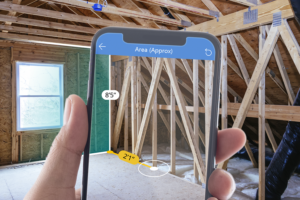
“We added straightforward Mixed Reality capabilities that enable you to build sophisticated, device-centric applications that leverage a phone’s built-in sensors to use MR to see images and models in a space as well as measure things,” said Uitz. “We’ve seen many customers leveraging their mission-critical Power Apps business applications for huge improvements in their workflows.”


According to Uitz and Pile, the AR-enhanced Power Apps applications tend to focus on three areas. The first is sales team enablement. For example, salespeople are using Power Apps’ MR capabilities to help their customers visualize their products in their environment before they buy. A consumer packaged goods company salesperson could use AR to show a retailer how their product would look when installed in their stores and what it would mean in terms of incremental sales. That visualization can help close deals.


The AR visualization capabilities can be useful post-sales, as well. For example, a company can provide the installation team with images from various angles showing exactly where a product – visualized at real-world scale in their customer’s site through AR – needs to be installed.


Microsoft is also seeing its customers embrace the new AR capabilities for measuring applications. Armed with just a mobile phone, a flooring contractor can quickly measure an area to provide an accurate estimate of the amount of flooring needed for the space. Because it’s integrated with Power Apps, Dynamics 365, and Dataverse, it can be set up to support the entire business workflow.


“The user can open the Power Apps application, press ‘measure,’ take the measurements, press ‘submit,’ and the pricing calculations are done automatically, captured in the system, and an estimate email automatically sent to the customer,” said Uitz.


Another popular measuring use case is auditing. For example, users can use the measuring capability to confirm that a building is compliant with their local building code, including enough space for egress and sufficient lines of sight. This can save hours of time and effort doing physical measurements and recording data by hand.


“We’re all about democratizing Mixed Reality – making it another tool in the worker’s toolbox,” said Uitz. On top of that, Power Apps provides enterprise security and enterprise scalability, so a user-developed AR-enabled application can easily ramp up from a small, local trial to an enterprise-wide deployment without difficulty.


The democratizing of Mixed Reality extends to the hardware requirements, as well. Power Apps’ MR capabilities do not require a HoloLens; they work with any iPhone, iPad, or Android phone that supports ARKit / ARCore.


“The goal is to get companies to integrate MR capabilities into their mission-critical workflows to make their lives better,” said Uitz.


As these capabilities become better known, Uitz and Pile are expecting more Power Apps users to take advantage of the ability to: view and manipulate 3D content; overlay 3D content and 2D images onto the feed from the camera; measure distance, area, and volume using a device with AR; and identify spaces in the real world through an AR overlay.


Meanwhile, Microsoft is continuing to enhance the software to add additional industrial-strength features, and the Power Apps team is open to working with customers to add capabilities for their particular use cases.


“More often than not, it’s not a new thing that they want to do,” explained Pile. “It’s something that they’ve always done, but they want to do it faster, or at lower cost, or integrate into existing workflows. That’s where our primary focus is.”


Another key focus is getting the word out. Uitz, Pile, and the rest of the Power Apps team have been offering a variety of resources to increase awareness among customers and get them thinking about what AR capabilities can do for their operations. Readers interested in learning more can go here and here.


If the Power Apps team is successful, more enterprises will get their first AR experience, not from super-sophisticated “gee-wizardry” AR pilots, but from AR enhancements that deliver immediate value to their everyday solutions.


Inside the AREA Requirements Committee with Brian Kononchik

Inside the AREA Requirements Committee with Brian Kononchik

The work of the AREA is largely driven by its member committees: Research, Interoperability & Standards, Safety, Human Factors, Requirements, Marketing, and Security. Each of these groups is focused on activities that contribute to the development of knowledge about the adoption of enterprise AR and the practical implementation of AR use cases. For AREA members, participation in one or more of the AREA committees is an opportunity to share expertise, interact with other experts, and make a meaningful impact on the future of enterprise AR.


This is the third in a series of blog articles exploring the committees and their work. Our guide to the AREA Requirements Committee was Brian Kononchik, the Committee’s chair and Director of Innovative Technologies at Boston Engineering.


AREA: Tell us how you got into enterprise AR.


Kononchik: About 12 years ago, I started my career working alongside a prominent advanced technology investor and visionary. Together, we worked as contractors and consultants to some big names in the consumer electronics and automotive space. During that time, I realized that the status quo is never good enough, there needs to be more. That’s when I shifted my focus to innovation instead of that status quo. That’s how I became an early adopter of VR technology, holographics, and eventually AR. After a while, I jumped to an engineering firm that did development work for Siemens, which is, of course, a very big name in manufacturing with equipment, PLCs, PLM, and CAD platforms.


While I was there, one of the largest submarine manufacturers in the world needed an innovation engineer on their advanced technology team. The assignment was to create an immersive VR experience that utilized existing CAD data to provide an experience where a user can enter a submarine, navigate freely, and plan for job assignments. That led to more projects and eventually including Augmented Reality answering the questions: How can we use AR to help shipbuilders? How can we merge AR and VR to help shipbuilders collaborate and work more effectively?


Then about five years ago, the need for AR at scale became more and more prominent. I then went to work for PTC as a Director of Product Management for the Spatial AR initiative working with big name manufacturers in the automotive, semi-conductor, and manufacturing equipment space. That experience eventually brought me over to Boston Engineering where I’m now leading the Industry 4.0, Innovative Technology initiatives. I’m all about giving people value, and enterprise AR is delivering on that promise.


AREA: For our readers who aren’t familiar with it, what does the AREA Requirements Committee do?


Kononchik: We’re working in collaboration with a lot of big organizations involved with the AREA to help define global standards for hardware and software. When I say hardware, I am talking about mobile devices like the iPhone or Galaxy s20, Assisted Reality devices like RealWear, and fully-immersive, head-mounted displays, like the Magic Leap and HoloLens 2. We’re trying to define a set of standards that people could build hardware against. Having universal standards will allow for increased technology adoption.


On the software side, we’re trying to do something similar. We’re trying to lay out a set of standards for people that want to go build AR enterprise applications. After all the requirements are finalized, the next big thing we’re going to do is build out an automated process to help someone understand the starting point for addressing their particular use case. So, you would input your industry and use case. Say you’re in the oil and gas industry and you have the challenge of individuals collaborating while they are not in the same location. That would be a remote assistance use case. You then need to input your environment. In this scenario, you specify that the work is being performed mainly outside. Those are your three starting variables: oil and gas, remote assistance, and outside. We’re working on an automated process that recommends options; the more details you provide, the better the recommendation. We’re not just trying to define requirements. We’re trying to define requirements for use cases and provide a way to streamline adoption within an organization.


AREA: It sounds like you’re working two sides of the equation here. You’re pushing for standards on one end and providing guidance to adopters on the other.


Kononchik: Correct. We have our set of standards being developed, and then we have the AREA Statement of Needs, or ASoN, tool. It’s designed to help others identify the AR setups related to their use cases. These setups can be actions taken right away to get AR implemented into their organizations.


AREA: On the standards side, are you looking at work that standards bodies are already doing and making recommendations about which standards to implement?


Kononchik: It’s a combination. For example, we break hardware down into many different categories: wearability, sensors, communications, audio, and so forth. For each category, you have a breakdown of different device types. For example, sensors. You have mobile, assisted, and fully immersive head-mounted devices (HMD). A requirement for a fully immersive HMD should have no fewer than two world cameras because that will help you compute your 3D world maps. A device should also have at least a single RGB camera because that will help with QR code recognition and remote assist scenarios. So, those are some of the hardware type standards being developed.


When it comes to safety, though, we reference the industry standards. There are already existing environmental standards, say regarding operational temperature range, that hardware manufacturers must follow. So, we just reference those standards that exist. And then, where standards don’t exist, we’re trying to collectively understand what can be done today and where the market is going to establish new standards which organizations do not necessarily follow today.


AREA: The ASoN tool has been available for a while now. What’s the latest on that?


Kononchik: It is currently running on an older platform, and we are in the process of upgrading the application and migrating the data over to a new platform. So, people can use it and benefit from it today, but we are looking to cleanse the tool eliminating some bloat that accumulated over time. It is accessible and fully operational today and should be used and benefited from.


AREA: Do you have a wish list of things you’d love to see the Requirements Committee get done in the near future?


Kononchik: Right now, I want to see us go through and overhaul the hardware and software requirements and collectively agree on what they should be. We’re in the process of that now. Beyond that, my goal is to make the ASoN tool everything it’s promising to be. I would love to see it work so that, if say I were an automotive industry member and I entered in a very few parameters, I would get a full spec readout of what I needed to do next and why I need to do it. It’s not there yet, but I would love to see that.


AREA: Is that doable in the near future?


Kononchik: I would say within the next year, probably yes. That granularity will be well along its way. We have a lot of great minds working with us in this Requirements Committee – a lot of industry experience and industry knowledge, and not just hardware building and software development-specific. We also have input from the community members who focus on consulting with organizations, and they really understand what customers are looking for. When we join all this knowledge together, it really comprises the three pillars of successful AR implementation and development.


AREA: What kind of people are you looking for to become part of the Requirements Committee? Are there certain skills you need or certain types of people that you’re hoping can join the group?


Kononchik: We’re looking for multiple types of skillsets. First off, we’re looking for members of the hardware and software communities – smaller startups, enterprises, and places with new innovative solutions. And within those sectors, we’re looking for product leaders. Leaders in product strategy, product management, as well as technical areas to help get a good understanding of the market demands. Really want those feasibility, viability, and desirability type people – so, your business leaders, your product leaders, your design leaders, your technical leaders from both hardware and software. And we’re looking for the “go doers” – the people that go out to a customer and work with them for a year to implement AR. We want to understand the pain points of implementation, adoption, and scalability.


The onset of the pandemic really escalated the adoption of AR, and a lot of companies are seeing challenges adopting and scaling AR. Those companies are making do with the pain of adoption. The Requirements Committee can increase the visibility of the challenges adopters are facing and make those challenges more visible to the hardware creators and software development companies. Having visibility like this allows these organization to develop a strategy that fits market demands, satisfying their business, but more importantly, the customer.


If you’re an AREA member and would like more information about joining the AREA Requirements Committee, contact Brian Kononchik or AREA Executive Director Mark Sage. If you’re not yet an AREA member but care about ensuring safety in enterprise AR, please consider joining; you can find member information here.



Call for 10th Research Project Proposals – 3D mapping of enterprise and industrial environments for AR.

Industry Context for the Research

In showcases, Augmented Reality can be implemented to provide a highly sensitive, contextually-aware user interface to an enterprise’s facilities and assets. In such demonstrations, AR leverages prior investments to create and maintain “digital twins.” Having 3D models and maps of infrastructure and environments reduces the cost of AR experience development and discovery, and having AR-assisted devices continuously monitoring the real world permits updating the digital twins. Combining AR and 3D models and “spatially-anchored” or -aligned maps increases the ROI for several information technology stacks and reduces cost of operation and ownership.

Yet, in practice, enterprises seeking to expand their AR deployment in environments that can be captured in 3D are encountering significant obstacles. Even when available, AR experience authoring, publishing and delivery systems rarely connect to enterprise 3D environment maps, therefore, do not leverage existing investments. Developers must author or revise experiences every time there are changes in the environment. Users have to manually select AR experiences or AR-assisted procedures, instead of having a solution that automatically detects and associates procedures or other information with the user’s environment.

Practical knowledge about how to leverage existing spatial mapping for AR platforms and other tools/use cases is low. Knowledge of tools and techniques for creating and managing 3D environment maps (offline or in-situ) is also low. As a result, developers and engineers deploying enterprise AR miss valuable opportunities to:

      • Choose when/how/with which partners to add 3D mapping to their tool chains
      • Integrate and leverage 3D mapping in their authoring platforms
      • Integrate feature detection from 3D maps into AR experiences
      • Quickly and accurately capture 3D environments
      • Leverage existing standards for rapid/future-proof AR solutions based on 3D mapping

Project Goal

The AREA seeks to provide its members knowledge and deep understanding of the current state of the art of continuous or periodic 3D mapping of enterprise and industrial environments for AR and the available tools to leverage this information for the development of spatially aware applications such as AR. The project will also provide actionable information which members can use to more effectively identify solution providers and partners, and to leverage prior investments made by their own organizations or by their customers and partners, in digital twins and 3D spatial maps.

Fixed Fee Project

The AREA Research Committee budget for this project is $15,000. Organizations interested in conducting this research for the fixed fee are invited to submit proposals.

More information

Full information on the project needs, desired outcomes and required components of a winning proposal, including a submission form, can be found here.

If you have any questions concerning this project and the AREA Research Committee, please send an email to the Research Committee.


AREA Webinar Replay: IDC Analyst Sizes the Enterprise AR Hardware Market

That’s why, in early September, the AREA hosted a webinar entitled Sizing the Enterprise AR Hardware Market. The centerpiece of the event was a presentation by Tom Mainelli, VP of Devices at IDC, one of the IT industry’s most respected global analyst firms. We recorded the webinar and it’s now available here.

During the webinar, Mr. Mainelli explains how IDC sizes the current market and forecasts enterprise AR hardware growth. Along the way, he provides answers to such questions as:

  • What are the different approaches IDC uses when estimating enterprise AR hardware market size and growth?
  • What factors does IDC forecasting take into account when sizing the adoption of enterprise AR?
  • What important developments in 2021 will make this year memorable in the annals of enterprise AR history?

Don’t miss this opportunity to get an exclusive presentation of valuable insights about market sizing principles shared by one of the world’s leading analysts studying the AR display hardware market. Go here to view this one-hour presentation.


Keen Research Brings the Power of Speech Recognition to AR


Rockwell Automation Interview

With a heritage dating back more than a century, Rockwell Automation has long been at the forefront of industrial automation. Today, the $7 billion company offers a broad array of solutions and services that bring “The Connected Enterprise®” to life, including automation systems, integrated control systems, and factory software. We spoke with Rockwell’s Andrew Ellis shortly after the company joined the AREA as a Sponsor member.


AREA: Everybody knows Rockwell Automation – it’s a huge company with lots of different businesses in industrial automation. Could give us a perspective on your specific organization within Rockwell?


Ellis: Sure. I’m the director of our global tech consultants within a new office called the Digital Technical Office. Our tech consultants in the field help our customers align their digital transformation requirements with our capabilities. I also oversee a group of experts in different disciplines, including XR, Extended Reality. Again, our role is really working with the customers to understand their challenges and then align our portfolio to help them along on that journey.


AREA: Did the interest in XR come about because customers were asking about it, or was it because you looked into the future and said this is something we need to get into?


Ellis: When I first looked at AR several years ago, I was a bit skeptical, but it didn’t take long to change my point of view completely. Today, I don’t know how, in the near future, any customer will be able to move forward with a modern manufacturing facility without AR. It’s now similar to how it was in my early days of automation and IT/OT; there’s a lot of education going on with our customers to make them aware of the use cases, the problems AR solves, and the real benefits in an industrial landscape. For me personally, I’ve done a complete 180-degree turn around from “not sure” to “wow, you’ve got to go all-in on AR.” From our vustomer’s point of view, more and more they are asking for it, there’s no doubt. Almost on every opportunity, there are two things that come up – machine learning and Augmented Reality. How can they take advantage of it? It’s an extremely hot topic.


And of course, Rockwell’s interest and activities in AR accelerated considerably three years ago, when we made a $1 billion investment in PTC to partner with PTC and make it part of our InnovationSuite. Along with that came not only ThingWorx, their IoT platform, but Vuforia, their Augmented Reality platform.


AREA: What are the top industrial applications for AR that you’re talking to customers about?


Ellis: Number one is remote support. For us, that’s the application of Vuforia Chalk. The power of AR, using the camera on your phone to actually see it and then mark it up is huge, and to me it’s a no brainer. That’s a tool that needs to be in any field service person’s bag. Another is any kind of work instruction, whether simple or complex, where you want to have consistent methodology, and you want to get away from having to read 20 pages of a manual. The ramp-up time to understand how to assemble something, or for maintenance, to disassemble and repair something, is greatly shortened. That time savings is very valuable for customers.


A third popular use case is when you want to get a group of unskilled people up to speed quickly on a complex operation. They can use AR to walk them through the process – here’s the tools you need, here’s the safety instruction before you begin, here is the work instruction you need to follow – all manufacturers need to have this capability within their facility.


AREA: So the advantages of AR in all of those use cases are greater speed and efficiency, lower cost, and greater agility, right?


Ellis: Right. Even though we say we digitize our manuals, we’re simply making them digital as a file. The consumption still requires you to sit there and read something, whereas having it overlaid in front of you is just a totally different and better way of visualizing work instruction. The younger workers coming out of university and college are used to this. This is the world they want to live in, so we’ve got to provide the tools that are appropriate to them.


AREA: Have you seen the level of knowledge among customers increase a lot in recent years, or is there still a lot of education that has to go into the process?


Ellis: For our customers, there’s been a huge increase in awareness of what AR is and how it’s used. They’re now more interested to know what other customers have done. Nobody wants to be that first adopter. They want to be somewhere near the middle, and not the laggards. I think we’re still on that upward curve. It definitely hasn’t become standard in every processing plant or manufacturing facility, but there’s lots of research going on regarding how to apply it.


They want to know what other companies are getting for a return on investment. How did they deploy? What kind of infrastructure did they need? It is something that you need to have a solid wireless infrastructure available in your facility if you plan to use it for certain things, or a 5G network, whatever you want to use, but it makes the infrastructure really a prerequisite.


AREA: When you’re talking to prospects, and they say give me your best case study that you can share publicly, what do you tell them?


Ellis: Because we’re leveraging PTC product, a lot of our case studies are from PTC, because they’ve been doing this for a lot longer than us. But we also talk about our own internal case studies, because we’re a manufacturer as well, we’ve got 20-plus manufacturing facilities globally, and using AR with our equipment makes a lot of sense. Currently we’re working on an application where you can use AR to look at our MCC motor control centers, or our variable speed drives, or variable frequency drives, and start to get IoT data out of them. And not only the data, but start to get the predictions, obviously the predictions are coming from somewhere else, but now they’re showing up in AR.


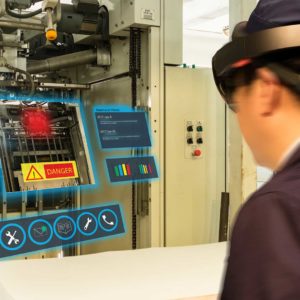
Or I can use it as virtual safety boundaries. If I’m using the HoloLens, and I’ve got spatial awareness, as I move into an area that may be considered dangerous, it’s fenced off virtually. We’re seeing a lot of benefit applying AR experiences to our own products to help our customers, as well as in our own manufacturing facilities when we’re doing virtual commissioning of equipment. So we can use Vuforia Chalk to look at an assembly and share it with a customer in the markup. That kind of virtual commissioning has been fantastic. So we’ve had a number of use cases where we’re using it ourselves in our own facilities.


AREA: Is there a vision for AR at Rockwell Automation, or is it considered just another tool in the toolbox you’re offering customers?


Ellis: I think it’s becoming part of our vision, a fundamental pillar in what we will provide to our customers. We can see a day when someone puts on either a 2D or 3D device, looks at their equipment or facility, and starts to visualize where the trouble spots are, what product is running through the line at this point in time, who is on the line working on it, what are the orders that are jammed up. You’ll be able to really visualize it so you don’t have to go into a traditional control room or open up your laptop to take a look at it.


We haven’t tapped all of it, but there’s so much interest in using AR in almost all of our products, from hardware in maintenance and safety, to assembly, to how to use, to troubleshooting, and then on the IoT side, consuming IoT data, or work instructions. It’s used everywhere, so I think it’s going to be a standard platform that you’ll see from Rockwell from now on.


AREA: Finally, could you tell us your reasons for joining the AREA?


Ellis: Our customers – whether it’s manufacturers or processing facilities – get a lot of their information from independent organizations like the AREA that are solely focused on sharing best practices standards and information gleaned from other users, and making it available to the wider ecosystem. That’s what the AREA does, and we wanted to be part of it – to contribute to it, sharing what we’re seeing as a manufacturer and what our customers are seeing, but also to gain access to the information the AREA is putting together. Your calculators are fantastic. We can point our customers to AREA literature that’s vendor-neutral – much like when I’m buying something, I want to look at Consumer Reports or another source that has no vendor bias. When you have an organization like the AREA, where you pull in vendors and users, and create material that we can consume, but more importantly share with our customers – to me that’s invaluable.


Matt Fleckenstein on Mixed Reality and New Microsoft Mesh

As a member of the AR ecosystem, you’re familiar with Microsoft HoloLens, of course. But are you aware of Microsoft’s AR strategy beyond its successful head-mounted display? To get answers, we spoke to Matt Fleckenstein, Head of Strategy, Commercial and Consumer Mixed Reality for the IT giant, which recently joined the AREA as a Sponsor member. A tech veteran with a rich and varied background, Matt gave us a fresh look at the future of AR/VR/MR at Microsoft.


AREA: Matt, welcome to the AREA! You’ve been in your new position at Microsoft for a few months now. Tell us about your role and the scope of your work.

Fleckenstein: I got recruited back to Microsoft two years ago, and I’ve spent most of my time driving our Mixed Reality business. I was on the product marketing team for the majority of that time, where I ran our go-to-market for our Mixed Reality business, and more recently I moved over to our engineering team to drive our Mixed Reality strategy and road map for our products and services.. We’re starting to look at what, if anything, we’re going to do beyond the VR stuff we have in market today in the consumer world. The commercial part is probably more apropos to what we’re talking about here.

AREA: You’re looking at both the commercial and consumer sides of things. Is there a lot of overlap between the two or are they pretty distinct?

Fleckenstein: It’s a great question. They’re fairly distinct today, but my point of view is that they’ll look more similar down the road. What I mean by that is, when you think about the world we’re in today, where we’re all forced to interact in much more remote manner. And whether I’m interacting with other people for work purposes or in my personal life, over time those things will look more and more alike.

A good example of that is our recent announcement of Microsoft Mesh. Microsoft Mesh is an enabling platform to usher in the era of collaborative computing, enabling users to work, play, and learn together remotely, as if they were there in person. Using any MR-enabled device (such as HoloLens, Quest, or AR-enabled phones), users can holoport themselves or their avatars into any location to enable rich, immersive shared experiences. This has broad applicability across both commercial and consumer businesses from hosting virtual conferences to remote meetings to rock concerts. When you think about it in that context, even though the content is different, the ability to connect with other humans and collaborate is a human need across our work and personal lives.

AREA: I would imagine, too, that you’re going to learn different things from the commercial and consumer sides that could be transferable between the two.

Fleckenstein: Yeah, I think that’s true. As the folks in the AREA well know, a lot of the use cases for enterprise Augmented, Mixed, and Virtual Reality today are in training. And some of that training is teaching people hard skills – for example, how to assemble a Rolls-Royce engine for an Airbus airplane. But others are more about teaching soft skills, whether it’s customer service skills or sales training and skills training. When you start to get into that world, it’s all about human connection and emotion, as well. So, while I do think they are different today, they will also definitely feed each other. There is more overlap probably than what may be apparent at first blush.

AREA: Can you give us a sense of the scope of Microsoft’s Mixed Reality strategy?

Fleckenstein: The biggest challenge I had when I was on the marketing side was overcoming the perception that we were about HoloLens and that was it. Certainly, that’s a big part of what we do. But we’ve tried to holistically build out a full Mixed Reality stack so that you can have all the tools and services running in Azure that you need in conjunction with 3D content platforms like Unity and Unreal. So, that you can build the applications and manage the applications that you need in the enterprise space – whether that’s running on a HoloLens device or a mobile device. You know, we’ve built a rich set of mixed reality Azure services and support that development with deep integration with those 3D content platforms. So, we’ve got kind of that PaaS layer that really can be helpful.

We also have our first-party SaaS applications. We have two applications in our Microsoft Dynamics 365 group: Remote Assist and Guides. Remote Assist is all about the use case for bringing in a remote expert to help you with whatever you’re doing. That could be a field service agent who’s out trying to repair a complex piece of machinery and needs an additional set of eyes and ears and hands to help do what they’re doing. Or it could be a medical professional who wants to patch in an expert to get a second opinion on something. Guides is all about the step-by-step guidance to help you perform a task. Go back to that Rolls Royce engine for an airplane, right? Teaching a new employee how to assemble or how to repair one of those – leveraging the power of overlaying 3D holographic images on top of what you’re doing to walk you through exactly what you need to do is one of the use cases that we see today. So, we’ve got our own first-party set of applications that run on HoloLens but also run on other endpoints like mobile devices and tablets.

And then we’ve got Microsoft Mesh and a variety of mixed reality PaaS services that have enabled a robust ecosystem of about 175 different enterprise ISV’s who have built applications to solve different use cases in different industries, some leveraging HoloLens and some leveraging other endpoints. The industries served include health care, manufacturing, architecture, construction, and engineering.

Then of course we’ve got the AltspaceVR service where people can gather in VR and do everything from rock concerts to conferences to virtual meetings. It’s a pretty robust stack when you look at what we’re kind of trying to build out, end to end. Ultimately, our focus is to leverage the power of Augmented, Virtual, and Mixed Reality to enhance the next generation of experiences across consumer and commercial worlds.

AREA: What’s at the top of your to-do list for 2021?

Fleckenstein: We’re doubling down on how we can, at scale, light up the next generation of collaboration as evidenced by our launch of Microsoft Mesh. A lot of the work that’s been done in enterprises today, a lot of the success that folks have had with Mixed Reality, with HoloLens, has been helping individuals complete a job. I think the opportunity exists for much more. This dialogue we’re having remotely through a 2D medium would be so much richer if you and I were sitting down having a cup of coffee in front of the fireplace having a chat. So our focus is on how we light up the next generation of collaboration, whether it’s me talking to my parents back in Punxsutawney, PA to get an update on whether Phil saw his shadow or not, or having a work meeting with a bunch of people. How can we best transcend time and space and create that next generation of collaboration?

AREA: What do you see as the most important barriers that need to come down to open up all these opportunities?

Fleckenstein: There’s a whole set of practical obstacles in the enterprise that we need to keep working through. Those include everything from making it easier for IT departments to manage a suite of different devices to enable Mixed Reality experiences in their enterprises. That’s everything from security to device management to dealing with authentication and identity. There’s more work to do to make all of that easier so that we can move from companies deploying dozens or hundreds of these devices to thousands to 10,000’s of these devices.

There are certainly companies who are leading the way on that, like Toyota, for example, which is putting HoloLens devices in every one of their dealerships in their service centers so that they can offer next-generation customer experiences. That’s going to happen in the tens of thousands, but that’s rare still today. So, the main obstacles are the physical IT deployment and rollout tasks that need more maturity.

AREA: Right. The less glamorous stuff.

Fleckenstein: Yeah, but it’s absolutely necessary. We saw it with mobile devices when people started bringing their iPhones to work. You have to do that foundational work if you want to operate it at scale. The other key is change management. New technologies are always tough to introduce. How do you bring along the people and the processes to support the evolution that’s happening? How do we manage the transition from mobile devices and computer screens to head-mounted displays and ultimately glasses?

The expanded adoption of Mixed Reality will also require us to defy physics by making the devices smaller and more lightweight while making the displays and the field of view better and bigger and improving battery life all at the same time. I do think smaller form factors that lower costs are really going to be imperative for us to really unlock the full potential of the technology. We just need to keep making the products lighter and better and bringing down that cost.

AREA: What does Microsoft expect to get out of being a member of the AREA?

Fleckenstein: One of the things that was most attractive, and one of the reasons why we joined, was to get access to a lot of the research and tools the AREA has put together. There’s just nothing else like it out there – whether it’s an incredibly robust worksheet to help you build out the business case for your organization, or the research the AREA has conducted to understand what people are really doing with the technology. What are the challenges that they’re facing? What are the requirements that aren’t being met? There’s tons of research out there about this space in general, but it’s fairly high level and it’s fairly broad. One of the biggest things the AREA has going for it is the rigor and depth of the research. It’s been fantastic.


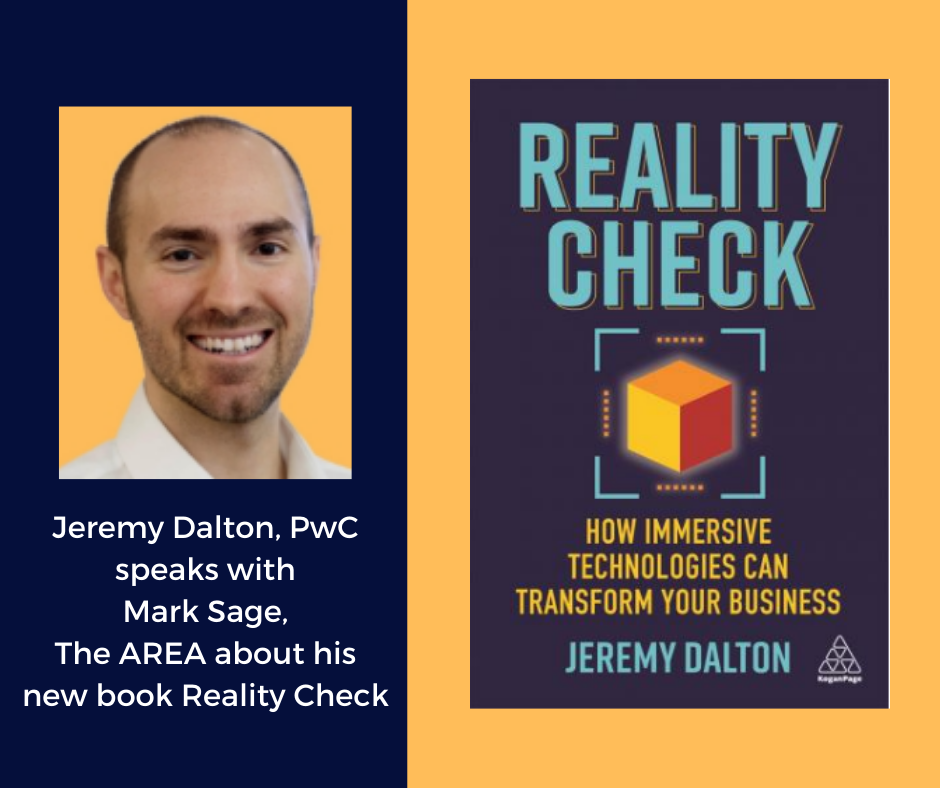
AREA podcast features PwC’s Jeremy Dalton’s new book, Reality Check


As the Head of XR at PwC UK, Jeremy Dalton saw a fundamental problem in the marketplace: too many enterprises had misconceptions about – or simply didn’t understand – the tremendous potential of AR and VR to transform their businesses. So, Dalton took it upon himself to get the message out. 

The result is his new book, Reality Check. Reality Check dispels common myths about AR and VR and details how business leaders can integrate immersive technologies into their organizations to deliver more efficient, impactful and cost-effective solutions. Dalton backs up his argument with compelling case studies from organizations such as Cisco, Ford, GlaxoSmithKline, LaLiga, and Vodafone. 

AREA Executive Director Mark Sage hosted a podcast with Jeremy Dalton recently to discuss the book and its findings. Go here to hear their conversation. To order a copy of Reality Check and receive an AREA 20% discount, go here and enter the discount code AREA20 before March 5, 2021.